Free, open-source macOS app · Current build 1.2 · Version 1.2.1 clearing review

Smart Telescope Sort

Turn messy smart-telescope download folders into a clean library. Copy your sessions onto your Mac and choose the Capture Folder. The app detects the folder layout, you pick TIFF, FITS or JPG, review the file plan, then Sort into Targets by year and object. Every file is copied and checked byte for byte before any original is deleted. Independent app. Not affiliated with telescope manufacturers.

Update coming: version 1.2.1. Smart Telescope Sort becomes Telescope Data Sort, works with data from any telescope or camera in folders named for the object, and gets a new Windows 11 version. Both are clearing review with Apple and Microsoft; links will be provided when approved.

Mac App Store Current build 1.2 User manual (PDF) Current build 1.2 Get it from the Microsoft Store Windows user manual (PDF) App feedback Source on GitHub Privacy

Open source: github.com/rderry/Smart-Telescope-Sort. If you change it and give it away, please give credit to BigSkyAstro: include the BigSkyAstro logo and a link to bigskyastro.com.

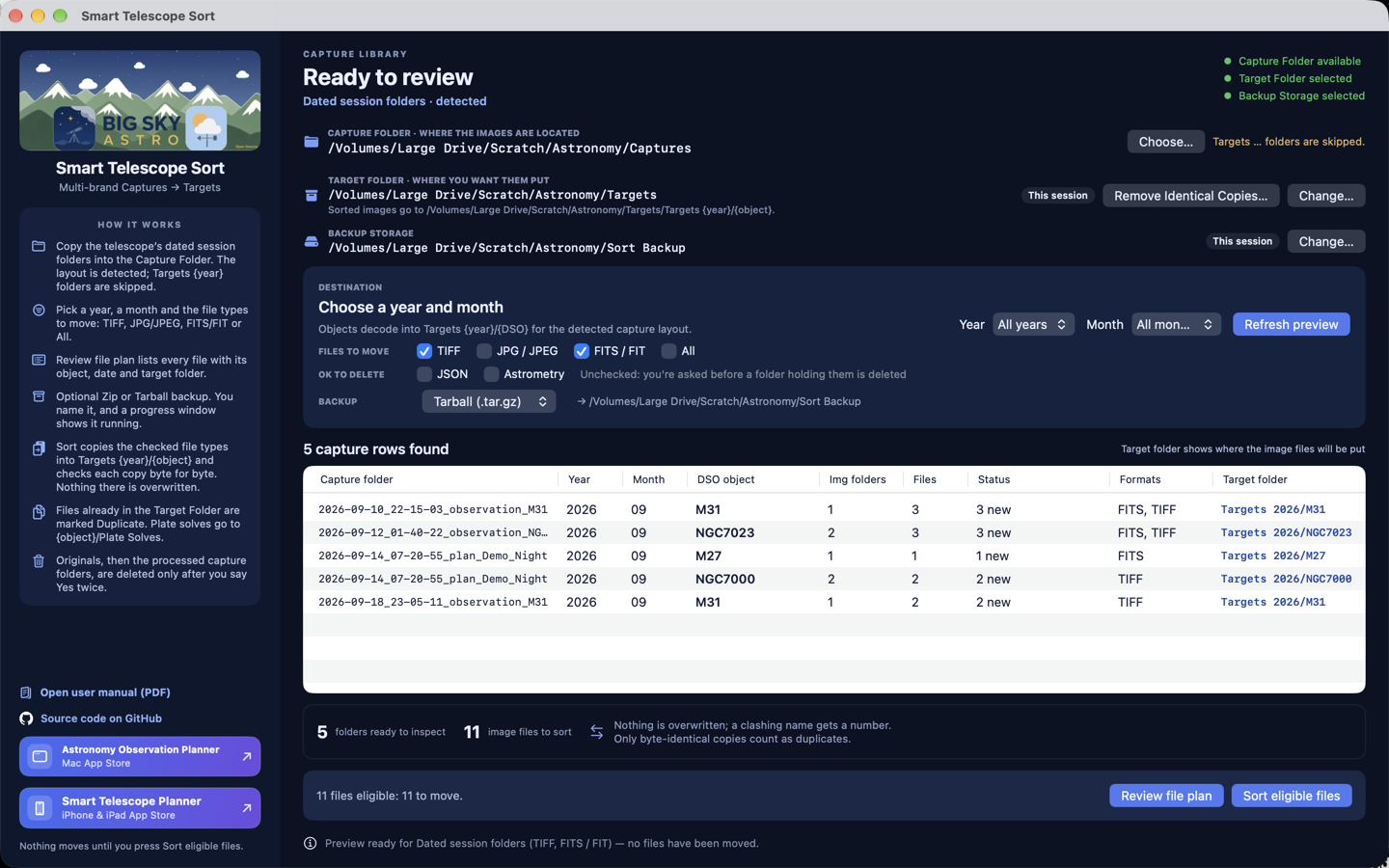
Smart Telescope Sort 1.2 macOS window showing the detected folder layout, folder status lights, file types, OK to Delete options, and sort preview.

What it does

Organize captures after you copy them off the scope

Smart Telescope Sort is free. It does not connect to or control your telescope. It organizes files you already copied to a Captures folder on your Mac.

Layout detected for you

Dated sessions (Vespera, Stellina). Object albums (S30, S30 Pro, S50). Session folders (DWARF 3, II, mini). Object-and-date folders (Origin Mark II). The app recognizes the layout from your Captures folder. Names identify layouts only.

Any telescope or camera (new in 1.2.1)

Images from any other telescope or camera, including a classic telescope with an astronomy camera or DSLR, sort the same way when they are TIFF or FITS (JPG optional) in a folder named for the object, such as M31 or NGC 7000. Files are copied unchanged; nothing is converted.

Clean Targets library

Sorts TIFF, FITS and JPG, your choice, into Targets {year}/{object} so multi-night captures of the same object stay together. Plate solves go to {object}/Plate Solves, next to their images.

Copy, check, then delete

Each file is copied into Targets and checked byte for byte. Nothing in Targets is overwritten. Originals, and then the processed capture folders, are deleted only after every move is done and you say Yes twice.

Review, then Sort

Review file plan lists every file and where it goes before anything changes. Optional named zip or tarball backup first, with a progress bar and Cancel.

Your other files are safe

OK to Delete checkboxes decide whether JSON and astrometry files may go without asking. A folder holding any other files, such as Affinity Photo, XISF or notes, is never deleted. Removed files go to the Trash on a Mac or the Recycle Bin on Windows.

Help

How to sort a night

1. Copy the files

Use the telescope’s USB, FTP or Wi‑Fi export. Put the session folders in a Capture Folder on your computer. The first time, accept the terms and tell the app where your Target Folder and Backup Storage live.

2. Choose the folder and file types

Choose the Capture Folder; every subfolder is scanned and the layout is detected. Check TIFF, JPG / JPEG, FITS / FIT or All. Nothing is moved yet.

3. Review the plan

Press Review file plan. It shows every new file, its target folder, and files already in Targets. Close the list if you do not want to continue.

4. Sort

Press Sort eligible files. Name the backup and watch it run, then confirm. Each file is copied and checked. Then choose what happens to plate solves and calibration folders, and say Yes twice to delete the originals.

Requires macOS 15 or later. Apple silicon and Intel. Free, including Family Sharing. The manual is in the app under Help, or download the user manual (PDF) Current build 1.2. The Windows 11 version is coming with 1.2.1.

Privacy and disclaimer

Local files only

Privacy

The app works only with the folders you choose. Your preferences, chosen folders and terms acceptance record stay on your computer. Sorting works offline; the app makes no network connections of its own. Contact support@bigskyastro.com for privacy questions.

Disclaimer

BigSkyAstro is not responsible for the loss of data. We have built in many safeguards to prevent it. The user accepts all liability using this freeware. The app does not control vendor telescope apps. Sort copies files according to the previewed file plan and deletes only after you confirm. It does not stack, process or validate image quality. Keep a backup of masters before sorting.

Full privacy details · support@bigskyastro.com

Open source

Free on Mac, Windows coming

Smart Telescope Sort is open-source freeware under the MIT license with attribution: github.com/rderry/Smart-Telescope-Sort. If you change it and give it away, please give credit to BigSkyAstro with the BigSkyAstro logo and a link to bigskyastro.com.